
















Part 3: The anatomy of supply chain attacks: Non-human identities & TPRM failure

“Identity is the new perimeter.” This catch phrase is present in almost every website of identity security vendors, and for a good reason. Human access, more commonly referred to as user access, is an established security program in most organizations – big or small. The realization that user identities and login credentials need to be vigorously protected with IAM policies and security tools like MFA or IP restrictions or via SSO happened long ago. However, when it comes to non-human access like API keys, OAuth tokens, service accounts, secrets and other programmable access credentials, the situation is very different. Lack of visibility, monitoring and governance to this permissive access is everywhere, and attackers have figured it out.
In this guide, we will deep dive into the non-human identities attack surface, how it’s created, how attackers exploit it, and what steps you can take to minimize your exposure now.
Part 1 & 2 recap
In the first and second installments of this series, we covered the non-human identity problem and the drivers that make it such a prevalent security gap. The modern standards for speed, automation, and free flowing data between platforms have increased the proliferation of non-human identities.
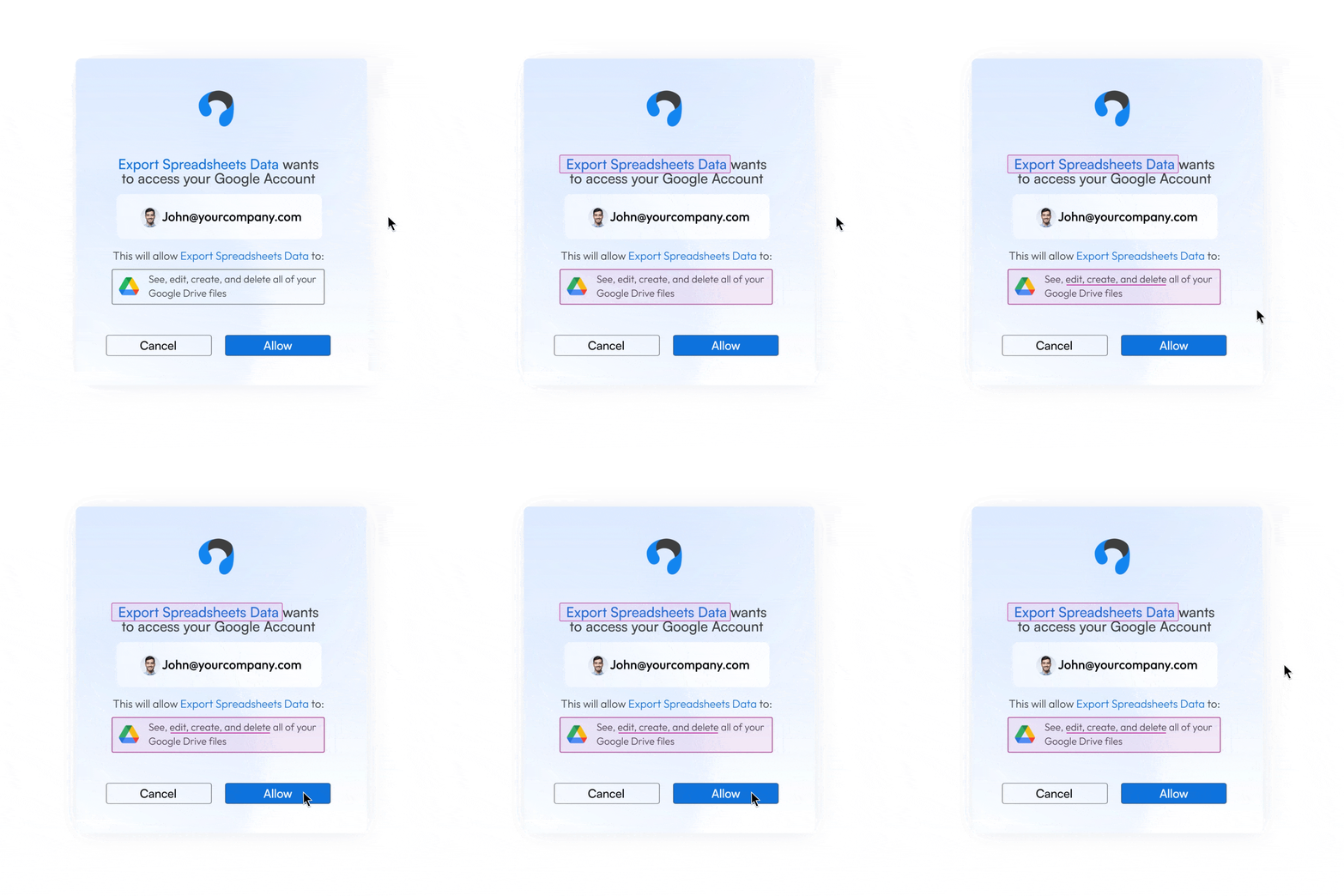
We dove into OAuth, one of the most commonly used authorization methods of non-human access, and covered the behind the scenes of the authorization process, the inherent issues of the framework and how attackers exploit OAuth apps for all parts of their attacks.
This brings us to the third installment, where we will cover how non-human identities are being leveraged within supply chain attacks, why attackers opt to use third party vendors as means to a larger attack, why TPRM programs simply cannot keep up, and how to stay ahead of attackers – by understanding their attack paths.
Watch the on-demand workshop: How attackers exploit non-human identities
Surprise! You might have been breached
It’s Sunday afternoon. You’re browsing what once was called Twitter. Only to find that a cloud-based identity provider has just fallen victim to a security incident… again. You open your email and indeed, an email is waiting confirming the incident.
You now have a pretty good idea of what the day, and the days after, are going to look like: meticulously gathering data, scraping logs for IoCs, researching what peers are doing about it, all while receiving never-ending pings and phone calls asking how this affects the business and what you are doing to control the spread.
Now consider the following.
Instead of a highly reputable Fortune 500 software vendor falling victim to attack, let’s imagine it’s a 365 marketplace application that’s used by 60% of the marketing team, built by a guy named Mark from Canada.
There was no Twitter post. No SLA to release a security incident finding. No email. In fact, you have no idea what this app does, what it’s used for, or that it even existed. But the attack has now left compromised access tokens with read/write access to your production tenant. Same level of access – but absolutely no communications of compromise.
So… Now what do you do?
Watch the on-demand workshop: How attackers exploit non-human identities
Supply chain attacks are the new standard
These days it’s more profitable for attackers to focus on compromising software providers, big and small. Why? Because if the attackers are successful, it gives them a beachhead into a network full of sensitive customer data. The ROI from an attacker’s perspective is exponentially higher when you consider the one to many attack vector that supply chain attacks offer threat actors.
The question is less “how are you protecting yourself from attackers?” and more “how are you protecting yourself from your vendors?” Your cloud providers? Your developers? Your employees installing every new shiny app? While security leaders have figured out supply chain attacks are something to carefully watch out for, more often than not current security programs still fall short in preventing such breaches.
Where Incident Response efforts fall short: The Cloudflare story
According to Verizon’s 2023 Data Breach Report, it takes the average business 204 days to identify a breach & a further 73 days to contain it. That’s almost 7 months from the time the attacker has made entry to freely move around the environment looking for breadcrumbs and compromising data – and that’s if the breach is detected at all.
Consider the Okta breach and its subsequent fallout as an example. In October 2023 attackers breached Okta’s support ticket system using a compromised service account. From there the attackers stole HAR files uploaded by Okta’s customers containing sensitive credentials & secrets. In late January 2024, Cloudflare shared that their entire Atlassian suite – Bitbucket, Jira and Confluence were breached back in November 2023 due to the same leaked credentials. These attacks against vendors create a domino effect into the technology supply chain.
Cloudflare, being an Okta customer, responded to the initial breach by rotating 5000 exposed credentials, however – they missed 4. And that’s all it took. A few weeks after the Okta incident, the same attackers used two of the four credentials that were not rotated to compromise Cloudflare’s Atlassian suite: A token and service account, both belonging to integrations within Cloudflare’s Atlassian environment. The stolen credentials were used to gain administrative access to Cloudflare’s Jira, Confluence and Bitbucket. This is a classic supply chain attack case – although not the initial entry point, Cloudflare’s most sensitive systems (source code, internal documentation, and issue tracking) were cracked.

Third-party machine to machine access is mostly ungoverned
While the Oktas and Microsofts of the world still get breached, the vendor supply chain problem is exacerbated with the huge array of apps and tools available today for the average user. Most developers contributing a cool new app or widget to the 365 or Salesforce marketplaces do not possess the resources or sophistication of the average business when it comes to detecting and remediating threats.

These apps and tools get access to our corporate environments with the click of a button, and with near-zero governance and visibility for security teams. According to Astrix research, 1 in every 10 OAuth apps connected to Google Workspace are connected with a highly-privileged, administrative account. When you consider the impact of that blast radius, it’s pretty damning.
Most of our focus around identity is heavily placed on internal security, with so much effort put into securing and educating end-users. But when it comes to non-human access, all of a sudden none of that matters, and security relies entirely on a third-party you have no control over and probably don’t even know about. Think about it: if a third-party token in your environment were to be compromised & stolen, would you know about it?
Watch the on-demand workshop: How attackers exploit non-human identities
There is no standardization for token management
This landscape is further complicated by the absence of a unified view across a variety of heterogeneous platforms. Each platform handles token management and app consents differently, making it nearly impossible to automate approval processes or track new consents across the board.
A few examples:
To get a list of installed applications in Google Workspace, you’ll have to go to the user page, click on a user, then scroll down and click “Connected Applications”. This process needs to be done individually per user, per org. Oh, did you want to get only the recent applications? You’ll have to pick only those with recent install time. Don’t worry, though, they’re not ordered and you can’t sort by install time.


Watch the on-demand workshop: How attackers exploit non-human identities
While Slack enables admin-approved processes by supporting automated approval/rejection processes based on scopes, this feature is only available with an enterprise license. If you don’t have that, you’ll have to go to a dashboard showing all apps installed on the workspace alongside their permissions. Oh, do you want to know who’s the vendor behind each app? You have to hope they took specific steps to add information to the app’s marketplace listing. Do you want to know which user installed which app? For that you’ll have to sift through thousands of logs to correlate an app to its installed users.

In M365, our options are to Allow All, or Block – and Allow with admin approval.
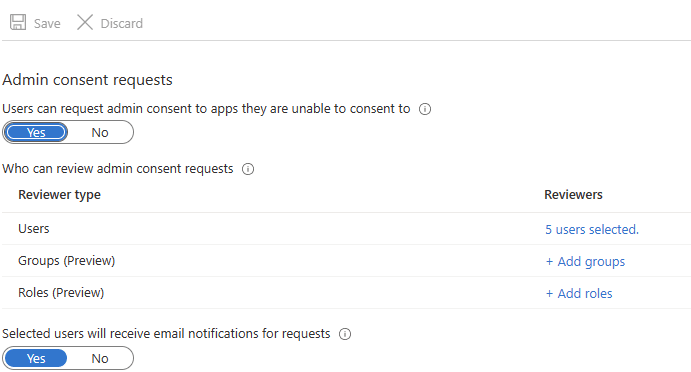
The first option, as is now understood, is a security nightmare.
The second option is an operational migraine; a bottleneck of frustration for end-users and 365 admins alike for a genuine business use case of increasing employee productivity. Not to mention, this onerous task is placed on the 365 administrator, when it should fall under the necessary security teams or better yet, the business unit who should ultimately own the risk for their department.
TPRM tools are not built for dynamic environments
Third Party Risk Management (TPRM) programs heavily rely on manual processes and transactional vendor assessments, primarily conducted through security questionnaires. However, this approach lacks the capability for ongoing evaluation of a vendor’s security posture. These assessments merely capture snapshots of security status, failing to adapt to the dynamic landscape of cybersecurity threats or changes in the vendor’s environment. Moreover, the manual nature of this process often proves cumbersome and time-consuming, resulting in infrequent updates and evaluations.
The practice of this discontinuous monitoring leaves organizations exposed to critical vulnerabilities that may arise between assessments. Leaving TPRM teams hamstrung by the lack of visibility into how vendors are performing within the environment and how the scope of permissions it has requested to operate is actually being utilized. Moreover, the term “vendor” is expanding into a broader landscape, with many entities entering through unconventional channels often unnoticed or unreported to the TPRM team.
Watch the on-demand workshop: How attackers exploit non-human identities
Key criteria for a successful non-human identity security strategy
Addressing this challenge requires a security strategy across disciplines; aligning privacy, TPRM, and Security with IT administrators, developers, and cloud architects. After all, we are each contributing to these newly created access points across CRM tools, SaaS marketplaces, development pipelines, GenAI, etc.
A collaborative approach significantly enhances security strategies by identifying third-party digital fingerprints (such as IPs and domains) and permission changes. This enables a comprehensive understanding of the potential impact in case of a breach and identifies the specific resources accessible through these connections. This will greatly help incident response teams to react swiftly in the event of a security breach.
Watch on-demand workshop: How attackers exploit non-human identities
 About the Author


